Big Data > TensorFlow > Example of TensorFlow
Simple TensorFlow Example
import numpy as np
import tensorflow as tf
Let 's create a computational graph that multiplies two numbers together.Tensorflow will create a node to connect the operation. In our example, it is called multiply. When the graph is determined, Tensorflow computational engines will multiply together X_1 and X_2.
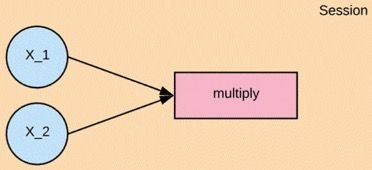
Finally, we will run a TensorFlow session that will run the computational graph with the values of X_1 and X_2 and print the result of the multiplication. When we create a node in Tensorflow, we have to choose what kind of node to create. The X1 and X2 nodes will be a placeholder node. The placeholder assigns a new value each time we make a calculation. We will create them as a TF dot placeholder node.
Step 1: Define the variable
X_1 = tf.placeholder(tf.float32, name = "X_1")
X_2 = tf.placeholder(tf.float32, name = "X_2")
Step 2: Define the computation
multiply = tf.multiply(X_1, X_2, name = "multiply")
Now we can define the node that does the multiplication operation. In Tensorflow we can do that by creating a tf.multiply node.
Step 3: Execute the operation
To execute operations in the graph, we have to create a session. In Tensorflow, it is done by tf.Session(). After creating or having a session we can ask the session to run operations on our computational graph by calling session. To run thecomputation, we need to use run.
When the addition operation runs, it is going to see that it needs to grab the values of the X_1 and X_2 nodes, so we also need to feed in values for X_1 and X_2. We can do that by supplying a parameter called feed_dict. We pass the value 1,2,3 for X_1 and 4,5,6 for X_2.
X_1 = tf.placeholder(tf.float32, name = "X_1")
X_2 = tf.placeholder(tf.float32, name = "X_2")
multiply = tf.multiply(X_1, X_2, name = "multiply")
with tf.Session() as session:
result = session.run(multiply, feed_dict={X_1:[1,2,3], X_2: [4,5,6]})
print(result)
[ 4. 10. 18.]
Algorithms supported by TensorFlow
No More
Feedback
ABOUT
Statlearner
Statlearner STUDY
Statlearner