Fundamentals of Computer > Output Devices > Monitor and its Usage
CRT Vs. LCD Monitors
Monitor is the most important, popular and widely used soft-copy output device with which users interact most often. Two important hardware devices determine the quality of the image a monitor displays:
- the monitor itself and
- the video controller.
Types of Monitor:
Two basic types of monitors are used with personal computers:
- CRT (cathode ray tube) type monitor
- LCD (liquid crystal display)
- Either of these two type of monitors can be monochrome, grayscale (displaying varying intensities of gray against a white background) or color.
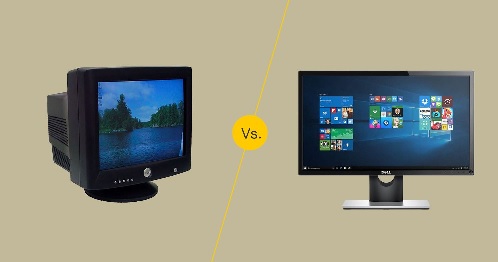
CRT Monitor:
- This type of monitor looks a lot like a TV screen that uses a vacuum tube as a display screen.
Merits of CRT Monitor:
- CRT monitor provides a bright, clear picture. In other words, its resolution is high.
- It is low in cost.
- Its viewing angle is wider.
Demerits of CRT Monitor:
- This type of monitor is big in size and large in weight, hence difficult to move.
- It needs comparatively much space to be fitted on the desk.
- It requires a lot of power to run; hence, it is not practical for use with notebook computers.
- Much more radiation emits from this type of monitor.
- It generates excessive heat.
LCD Monitor:
- It is a flat-panel monitor on which an image is created when the liquid crystal (that is normally transparent) becomes opaque when charged with electricity.
Merits of LCD Monitor:
- LCD monitor is small in size and light in weight, hence it is easily portable.
- Low operating power is required to run this type of monitor; hence it is widely used with notebook computers.
- There is no radiation from this monitor.
- It needs comparatively less space to be fitted on the lap or desk.
- It generates less heat.
Demerits of LCD Monitor:
- Image quality is not improved in this monitor, i.e. its resolution is poor.
- It is high in cost.
- It has a narrow viewing angle.
Differentiate between CRT and LCD Monitors:
|
Criteria |
CRT Monitor |
LCD Monitor |
|
1. Have radiation? |
Yes |
No |
|
2. Image quality (resolution) |
Improved |
Poor |
|
3. Heat generation |
Excessive |
Almost no |
|
4. Viewing angle |
Wider |
Narrow |
|
5. Power consumption |
High |
Low |
|
6. Size |
Bigger |
Smaller |
|
7. Weight |
Greater |
Lighter |
|
8. Cost |
Less |
More |
|
9. Space required on the desk |
More |
Less |
|
10. Portability/ Move |
Difficult |
Easy |
Screen Clarity
Even if the monitor looks good, you need to check the following most important screen clarity specifications:
- Resolution
- Refresh rate
- Dot pitch
Resolution:
- Resolution is the degree of sharpness or clarity of an image.
- A monitor’s actual resolution is determined by the video controller, not by the monitor itself.
- Monitor’s resolution is determined by the number of pixels on the screen. The more pixels a monitor can display, the higher its resolution and the clearer its images appear.
- Though more items can fit on the screen at higher resolutions, but the items appear smaller, resulting in eyestrain and squinting.
Refresh Rate:
- A monitor’s refresh rate is the number of times per second that the electron guns scan every pixel on the screen.
- Refresh rate is measured in hertz (Hz) or in cycle per second. If a monitor’s refresh rate is 100 Hz, it means that the monitor refreshes its pixels 100 times per second.
- If the screen is not refreshed often enough, it appears to flicker, and flicker is one of the main causes of eyestrain.
- In general, a refresh rate of 72 Hz or higher should not cause eyestrain. Some monitors have different refresh rates for different resolutions.
Dot Pitch:
- In color monitor, every pixel consists of three dots- one red, one green and one blue. The distance between the like-colored dots of adjacent pixels on a color monitor is called dot pitch. In other words, if you measure the distance between the red dots of two adjacent pixels, you are measuring the monitor’s dot pitch.
- Dot pitch is measured as a fraction of a millimeter (mm). It can range from .15 mm (very fine) to .40 mm or higher (coarse).
- As a general rule, the smaller the dot pitch, the finer and more detailed images will appear on the monitor. That is, the highest-resolution monitors have the smallest dot pitch.
- A color monitor with dot pitch not greater than 0.28 mm is better.

Printer and its Usage
No More
Feedback
ABOUT
Statlearner
Statlearner STUDY
Statlearner